According to CDC estimates for 2024, released in August 2026, about 7.15 million people in the United States had vision loss that glasses or contacts alone could not correct. About 706,000 had vision of 20/200 or worse in their better-seeing eye, even with the best available glasses or contacts. CDC classifies that level of vision loss as blindness. Another 6.44 million had vision loss but did not meet that threshold. Readable visual text helps people use their remaining sight, while raised letters and braille provide a way to read the same information by touch.
ADA font size depends on the type of character you’re specifying. While there is a lot of overlap between raised characters and visual characters, there are separate requirements for each. Applying the same sizing rule to both, even for something as small as spacing between characters (kerning) can produce a non-compliant sign.
In this article, we will cover:
- How raised and visual characters differ in style, case, and size
- Requirements for letter width, stroke thickness, and finish
- How sloped letter sides on raised characters affects spacing
- When the visual-character height table applies
ADA Character Height: Raised vs. Visual
The ADA requirements for raised characters are found in Section 703.2.5 and require a height between ⅝ in to 2 in. There is one exception that allows the characters to be smaller: ½ in minimum height is also permitted when separate raised and visual characters provide the same information.
Visual characters, on the other hand, have minimum heights based on both mounting height and viewing distance, noted under Table 703.5.5. Interestingly, 703.5.5 does not set a maximum character height for visual-only characters, only a minimum. Viewing distance is the horizontal distance from the sign’s characters to an obstruction that prevents someone from moving closer. For example, if a reception counter blocks access to the sign, measure from the characters to the counter’s nearest approach point. Typically the viewing distance for a standard room sign (which much be mounted with the tactical characters located between 48 in and 60 in above the ground) would be 6ft, or 72 in. That would put the minimum character height at 5/8in, the same as raised characters.
Of course, if raised characters are also visual characters, then the maximum height is 2 in as stated. Your standard room identification sign isn’t designed to be read from a distance greater than 180 in (15 ft). Anything that is designed to be read from further away, would need to be mounted higher than 70 in, and at that point this would be a separate visual-only sign.
How is height measured, if characters for visual signs can be both uppercase and lowercase? Character height is always measured by the height of the uppercase “I”.
Character Style
Visual characters are read by sight, while raised characters are read by touch. Raised letters need clear shapes and enough space between them so people can read them by touch. Visual letters need to be large enough to read from a distance and stand out against the background.
The ADA Standards sometimes also calls raised characters “tactile characters.”
Raised characters: These must be uppercase and sans serif (Sections 703.2.2 and 703.2.3).They also must not be oblique, italic, script, or any other decorative form.
Visual characters: These can use uppercase, lowercase, or mixed case. There are no requirements in regards to serifs. A conventional serif or sans serif typeface can comply if it meets the other style requirements regarding width and spacing.
Character Width & Proportions
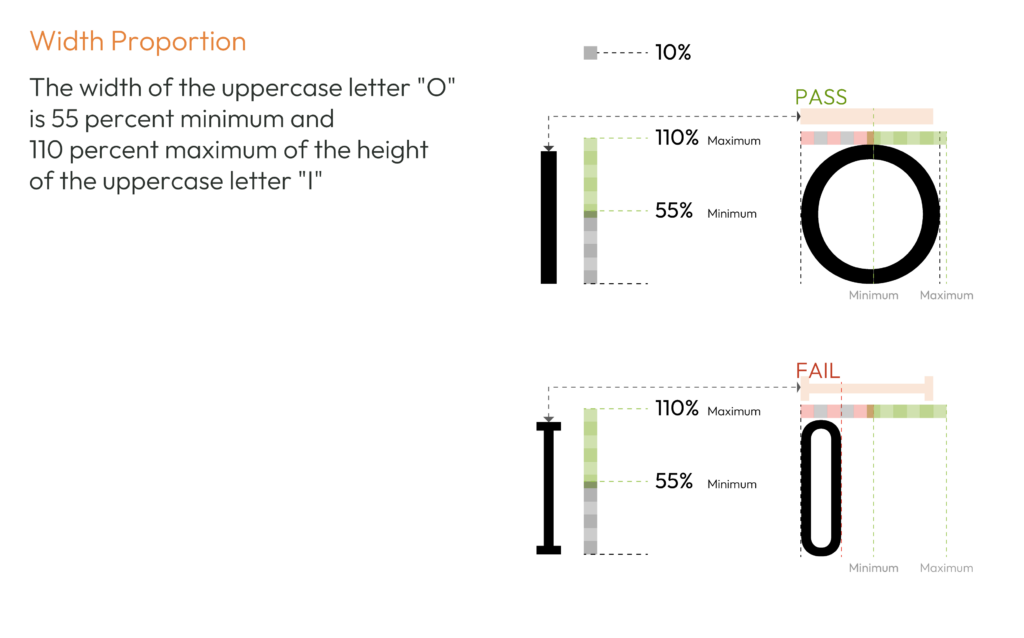
Both raised and visual characters follow the same guidelines for this. The ADA says that the font chosen must have an uppercase “O” that is between 55% and 110% of the height of the uppercase “I.” It doesn’t say anything about other characters within the font. Figure 2 shows how a narrow or wide “O” compares with the height of the “I,” using the limits in Sections 703.2.4 and 703.5.4.
Stroke Thickness
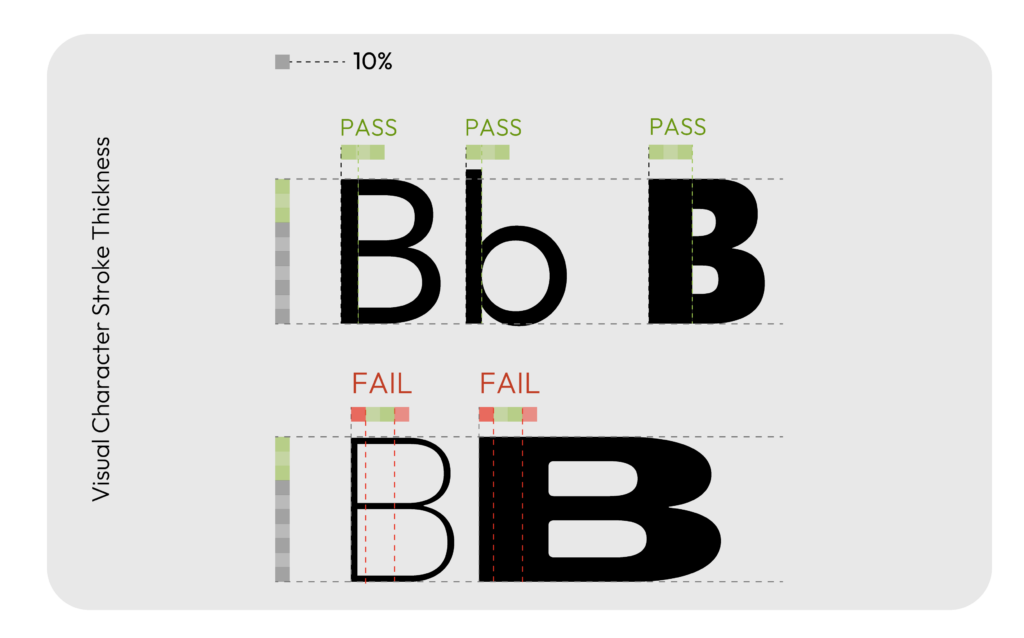
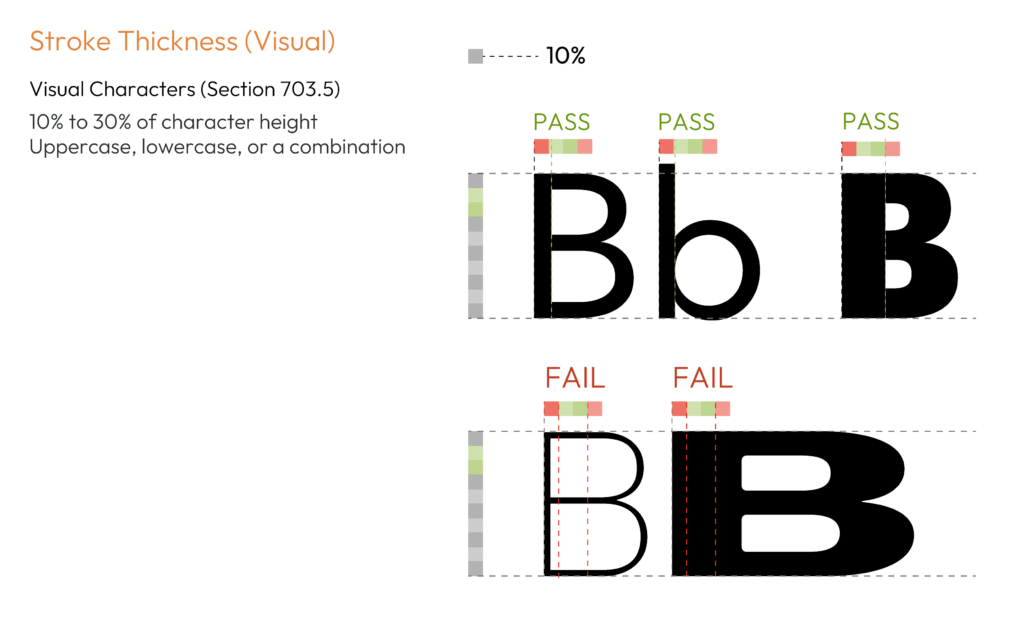
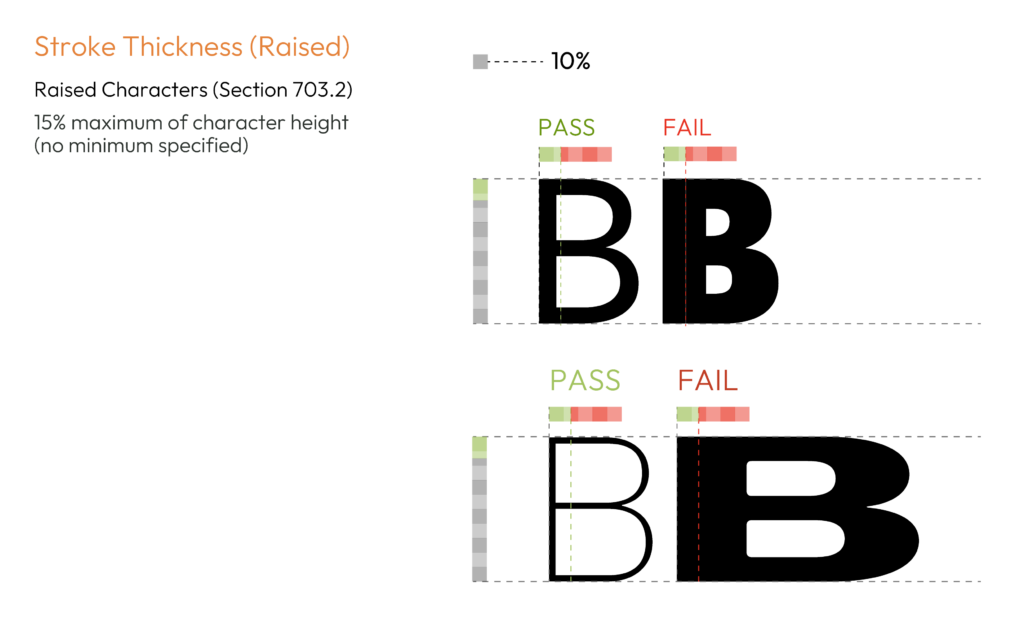
Stroke thickness in the ADA is the width of a line that forms a letter. Again, here we are using the uppercase “I” as the point of reference for both. For visual characters, the stroke width of the uppercase “I” must be 10% to 30% of its height (703.5.7). However the raised character requirements are different, and have no minimum. For raised characters, the stroke width of the uppercase “I” must not exceed 15% of its height. See 703.2.6.
Check stroke thickness separately when preparing artwork for raised and visual characters. A font that meets the visual range for visual characters may exceed the raised-character limit in Section 703.2.6.
Character Spacing
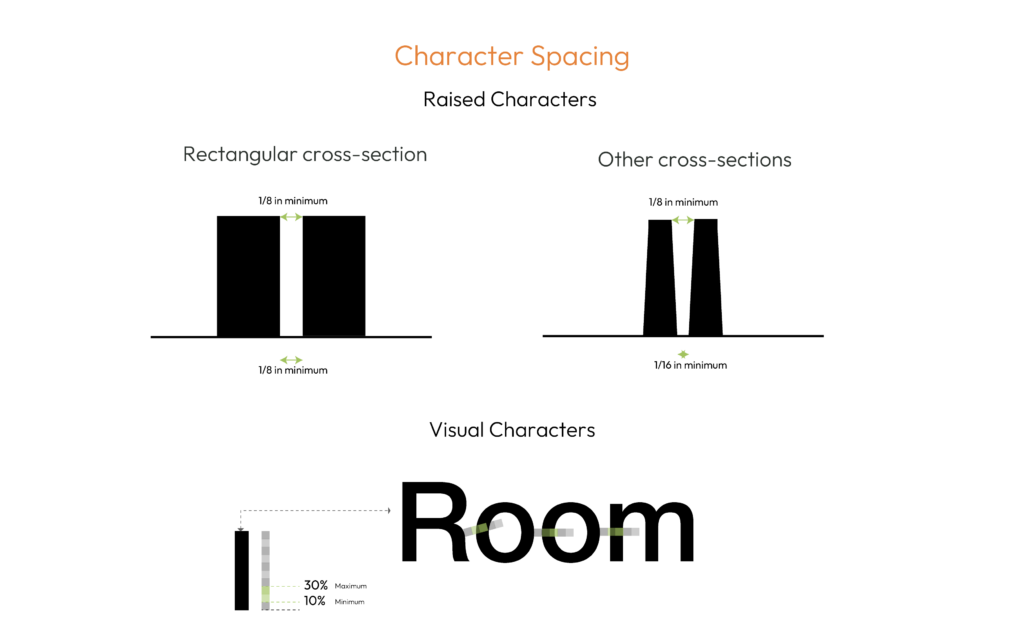
Section 703.2.7 measures the gap between the two closest points of adjacent raised characters within a message. Spaces between words do not count as part of this requirement. The character’s cross section can change which points are closest. A raised letter’s cross section is the shape you would see if the letter were cut through from top to base.
A rectangular cross section needs a 1/8-inch minimum gap. For sloped or beveled sides, the minimum is 1/16 inch at the base and 1/8 inch at the top. In either case, the maximum gap is four times the raised-character stroke width. Keep raised characters at least 3/8 inch from raised borders and decorative elements.
Visual characters follow a separate spacing rule. Under Section 703.5.8, the gap between the two closest points of adjacent visual characters must measure 10% to 35% of character height.
Two Design Cases
ADA font size rules change when one character set serves both visual and tactile readers. They also change when a sign uses separate visual and raised messages. That choice determines the lettering, height, contrast, and mounting rules.
Case 1: One set does both jobs

This is the standard room-identification sign. The same raised characters are read by touch and sight. Braille appears with those characters.
The Section 703.5 exception applies when visual characters also meet the raised-character rules in Section 703.2 and include braille that meets Section 703.3. In that case, Sections 703.5.2 through 703.5.9 do not apply. The raised-character rules control the lettering. The finish and contrast rule in Section 703.5.1 still applies.
Use sans serif, uppercase raised characters that measure from 5/8 inch to 2 inches high. Stroke thickness cannot exceed 15% of character height. Spacing must meet Section 703.2.7. Under Section 703.4.1, the baseline of the lowest tactile character must be at least 48 inches above the finished floor or ground. The baseline of the highest tactile character must be no more than 60 inches above that same surface. The sign also needs a non-glare finish and light characters on a dark background or dark characters on a light background.
Do not apply the visual-character viewing-distance table to this type of sign. When one character set meets the raised-character rules and includes compliant braille, the visual-character sizing rules do not apply. Using both sets of height rules can push letters beyond the 2-inch raised-character maximum.
The 1/2-inch raised-character minimum is not available in this case because there is no separate visual message carrying the same information.
Case 2: Separate visual and raised messages
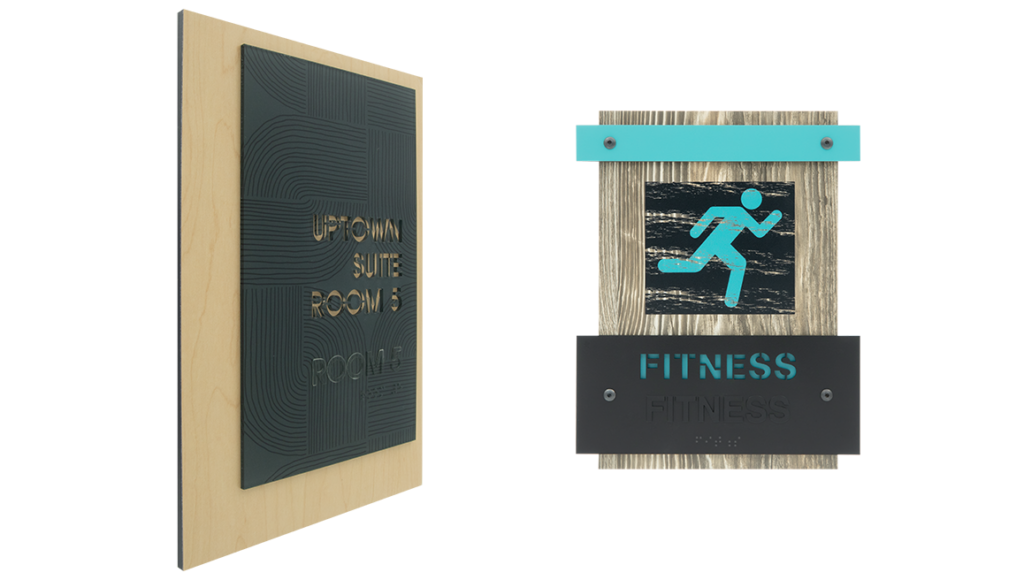
This case uses separate visual and raised messages that communicate the same information. A large visual label can sit higher on the sign. Smaller raised letters and braille can sit lower where someone can reach and read them by touch.
The Section 703.2.5 exception applies when separate raised and visual characters provide the same information. It allows raised characters to be as small as 1/2 inch high.
The two character sets follow different rules. Raised characters must be uppercase, sans serif, and readable by touch. Their mounting height must meet Section 703.4.1, using the floor-to-baseline measurements described in Case 1.
Visual characters follow Section 703.5. They can use mixed case and a conventional serif or sans serif typeface. They can also exceed 2 inches in height and use strokes thicker than the 15% maximum for raised characters. Under Section 703.5.6, visual characters must be at least 40 inches above the finished floor or ground. There’s no federal maximum mounting height – so theoretically you could have a very tall sign, but it’s unlikely, since the tactile characters need to be within a much more limited range.
The separate visual characters must have a non-glare finish. They must use light characters on a dark background or dark characters on a light background (updated by the ICC A117.1-2026 to require 65% light reflectance value difference for most visual characters). The raised characters must still meet the tactile requirements in Sections 703.2 and 703.3, including braille. Raised characters that also function as visual characters must meet the finish and contrast rule too.
For more on layout, color, and contrast choices, review our ADA sign design standards.
ADA Sign Lettering Requirements
Visual and raised characters share some measurements, but their rules for style, stroke thickness, and spacing differ. This table compares the main requirements.
| Requirement | Visual characters | Raised characters |
| Character height | Minimum depends on mounting height and viewing distance, based on the uppercase “I.” No maximum character height is specified. See 703.5.5 and Table 703.5.5. | 5/8 inch to 2 inches, based on the uppercase “I.” A 1/2-inch minimum is permitted when separate raised and visual characters provide the same information. See 703.2.5. |
| Font and case | Conventional letterforms; uppercase, lowercase, or mixed case. Serif or sans serif fonts may be used. No italic, oblique, script, highly decorative, or other unusual letterforms. See 703.5.2 and 703.5.3. | Uppercase and sans serif. No italic, oblique, script, highly decorative, or other unusual letterforms. See 703.2.2 and 703.2.3. |
| Letter width | Select a font whose uppercase “O” is 55% to 110% as wide as its uppercase “I” is tall. See 703.5.4. | Select a font whose uppercase “O” is 55% to 110% as wide as its uppercase “I” is tall. See 703.2.4. |
| Stroke thickness | The stroke width of the uppercase “I” must be 10% to 30% of its height. See 703.5.7. | The stroke width of the uppercase “I” must not exceed 15% of its height. See 703.2.6. |
| Character spacing | Gap between the closest points of adjacent characters: 10% to 35% of character height, excluding word spaces. See 703.5.8. | For letters with vertical sides and rectangular cross sections, the gap must be at least 1/8 inch. Other cross sections require at least 1/16 inch at the base and 1/8 inch at the top. Maximum gap: four times the raised-character stroke width. Exclude word spaces and keep characters at least 3/8 inch from raised borders and decorative elements. See 703.2.7. |
| Line spacing | Distance between the baselines of separate lines: 135% to 170% of character height. See 703.5.9. | Distance between the baselines of separate lines: 135% to 170% of raised-character height. See 703.2.8. |
| Depth and braille | Raised depth and braille are not required for visual-only text. See Section 703.5. | Characters must project at least 1/32 inch above the background. Matching contracted (Grade 2) braille is required below the corresponding text, or below the entire text block for multiple lines. Keep braille at least 3/8 inch from other tactile characters, raised borders, and decorative elements. See 703.2.1, 703.3, and 703.3.2. |
| Mounting height | At least 40 inches above the finished floor or ground. No maximum mounting height is specified. See 703.5.6. | Measure both limits from the finished floor or ground. The lowest tactile-character baseline must be at least 48 inches above that surface. The highest tactile-character baseline must be no more than 60 inches above it. See 703.4.1. |
| Finish and contrast | Characters and background must have a non-glare finish. Use light characters on a dark background or dark characters on a light background. No numeric contrast minimum is specified. See 703.5.1. | The same finish and contrast requirements apply when raised characters also serve as visual characters. See 703.5.1. |
Table note: When the same characters meet the raised-character requirements in Section 703.2 and are accompanied by braille complying with Section 703.3, the exception in Section 703.5 removes the visual-character requirements in Sections 703.5.2 through 703.5.9. The finish and contrast requirements in Section 703.5.1 still apply.